

Introduction
Understanding VPN performance is crucial for anyone relying on VPNAdWiser.com for VPN reviews, comparisons, and privacy/security tips. One of the most common questions is:
Do VPNs affect internet speed?
Yes — sometimes. But how much? Why? And can you minimize the impact? This comprehensive article dives into the mechanics of VPN speed, compares industry-leading providers, and offers actionable optimization strategies. Whether you’re streaming, gaming, or browsing, you’ll learn how to achieve fast VPN performance without sacrificing privacy.
How VPNs Work – The Basics of Encryption & Routing
Before exploring speed impacts, let’s briefly understand how VPNs operate:
- A VPN creates an encrypted tunnel between your device and a remote server.
- All traffic is routed through this server before reaching its final destination.
- This adds encryption overhead, latency, and extra routing—key factors that influence speed.
Why VPNs Can Slow Down Your Internet
Increased Latency (The “Trombone Effect”)
When traffic is routed to a distant VPN server and back, the travel time—and latency—increases. This “trombone effect” adds delay even if your ISP connection is fast.
Distance to VPN Server
Longer distance = slower response time. Choosing a geographically closer server greatly reduces latency.
Server Load & Throughput Limits
If many users connect to the same server, bandwidth is shared. Free or budget VPNs often overload servers, slowing individual speeds.
Encryption Protocol & CPU Overhead
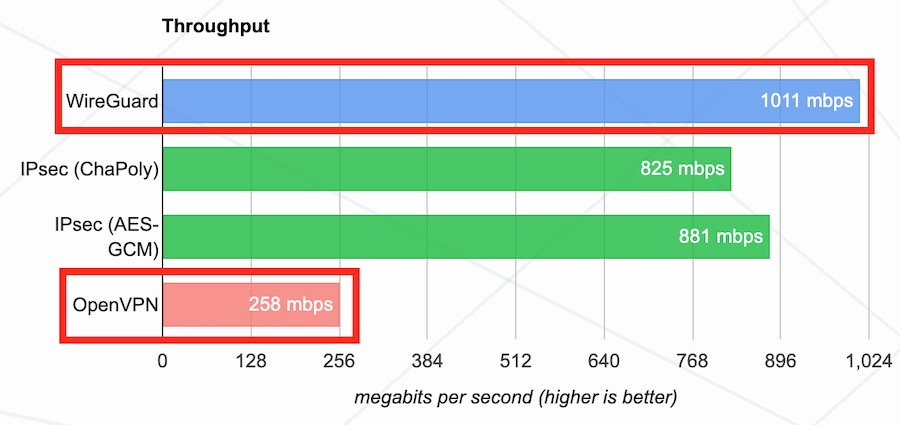
Strong encryption adds processing time. Older protocols like OpenVPN tend to be significantly slower than modern protocols such as WireGuard or NordLynx.
Your ISP’s Base Internet Speed
If your base internet is slow or subject to ISP throttling, the VPN can’t exceed that limit. Sometimes it helps bypass throttling, but it cannot create throughput beyond your plan’s capacity.
Device & Network Setup
Your device’s CPU and network medium—Wi-Fi vs. wired ethernet—can also affect VPN performance, especially during high processing or encryption tasks.
Can a VPN Ever Speed Up Your Internet?
Yes, under specific conditions:
- Bypassing ISP Throttling: VPNs can hide your traffic from ISPs that throttle specific services (e.g., Netflix), potentially improving streaming or download speeds.
- Better Routing Efficiency: Some premium VPNs offer optimized routing routes that outperform your ISP’s default routing path.
- Reduces Packet Loss: High-quality VPN providers can stabilize poor connections, reducing jitter and packet drops, which improves real-time performance.
Real‑World Speed Impact: Numbers & Examples
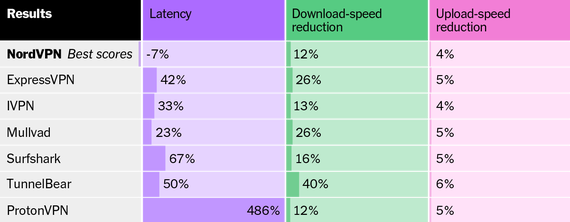
- Typical speed drop is 10–20% with modern, optimized VPNs using WireGuard or NordLynx. Some older protocols can cause up to 50% slowdown on slower hardware.
- Reddit user report: “My normal speed is over 900 Mbps … When VPN is on I get like 28 download and under 9 upload.”
Likely due to distant server and CPU bottleneck on the user’s device.
How to Test Your VPN Speed
List of simple steps:
- Run a speed test without VPN (use Speedtest.net or similar).
- Connect to VPN and repeat the test using a nearby server.
- Compare download, upload, and ping/latency values.
- Try different protocols (WireGuard, IKEv2, OpenVPN) and server locations.
- Record the results and calculate percentage difference.
Tips to Optimize VPN Speed
Pick a Server Close to You
Always choose the physically nearest server or one geographically close to the service you’re accessing. Aim for servers under 50% load when possible.
Use Faster Protocols
- WireGuard and NordLynx: Lightweight and ultra-fast encryption with minimal impact on speed.
- IKEv2/IPsec: Faster than OpenVPN, useful on mobile devices.
Enable Split Tunneling
Route only essential traffic through VPN. Non-critical apps can bypass it, reducing load and improving speeds for important tasks.
Close Background Apps & Reboot Devices
Terminate bandwidth‑heavy or CPU‑intensive programs before using a VPN. Restarting routers and devices often clears memory issues and improves performance.
Use Wired: Ethernet Over Wi‑Fi
Ethernet connections eliminate interference and reduce latency, which helps your VPN tunnel run more smoothly, especially during high‑speed transfers.
Upgrade Your Plan or Provider
If your ISP speed is the bottleneck, consider increasing bandwidth. Some VPNs can bypass throttling but can’t exceed connection capacity.
VPNs That Prioritize Speed (2025 Rankings)
According to Tom’s Guide and tech reviews in mid‑2025:
- Proton VPN: Fastest overall with WireGuard performance near 1,198 Mbps, strong privacy credentials.
- ExpressVPN: Lightway Turbo peaks at up to 1,617 Mbps on Windows, consistent cross‑platform speed.
- NordVPN: Uses NordLynx (WireGuard‑based), delivers around 901 Mbps, excellent streaming and security features.
- Surfshark: Budget‑friendly with strong unblocking and ~848 Mbps speeds.
When VPN Speed Issues Aren’t the VPN’s Fault
- Your device (CPU or memory) might limit throughput, especially when encrypting high volumes of data.
- Your local network (Wi‑Fi interference, ISP congestion) may reduce effective speeds.
- VPN client software bugs or background interference from antivirus/firewall might also hamper speeds.
Balancing Speed with Privacy & Security
Choosing a VPN often means trading off between light encryption and fast performance, or vice versa:
- WireGuard / NordLynx: Best combination of speed and security.
- AES‑256 encryption with OpenVPN: Offers robust security but at minor cost to speed.
- Split tunneling: Improves speed for casual activities but opens potential traffic exposure.
Summary Table – VPN Speed Factors & Optimization
| Factor | Impact on Speed | Optimization Tips |
|---|---|---|
| Server distance & load | High latency, slower throughput | Choose nearby, low‑load server |
| Encryption/protocol choice | Older protocols slow; modern ones much faster | Use WireGuard, NordLynx or IKEv2 |
| ISP speed/throttling | Limits max speed; VPN may bypass throttling | Test with/without VPN; upgrade if needed |
| Device & network setup | CPU limits, Wi‑Fi drops, background apps reduce performance | Close apps, use wired, reboot device/router |
| Split tunneling & routing | Reduces VPN usage load | Configure tunnels selectively |
Why VPNAdWiser Recommend Speed‑Optimized Providers
At VPN AdWiser, we test VPN providers based on speed, protocols, encryption, user‑load, and optimization tools. Our top picks in 2025 include Proton VPN, ExpressVPN, NordVPN, and Surfshark due to their strong performance across real‑world use cases. We provide detailed protocol tests and server performance data for each review.
FAQ
Q1: Will every VPN slow down my internet?
A: Yes, all VPNs add some latency and routing overhead—but quality VPNs using WireGuard or NordLynx generally reduce speed impact to under 20%.
Q2: How much slower is NordLynx vs OpenVPN?
A: NordLynx typically achieves several times faster speeds—hundreds of Mbps—versus OpenVPN, which may cause 30–50% slower performance.
Q3: Can free VPNs be fast?
A: Rarely. Free VPNs often restrict bandwidth and overload servers, resulting in poor speeds and unreliable performance.
Q4: Is split tunneling secure?
A: It’s safe if managed carefully. Traffic routed outside VPN is unprotected, so only use split tunneling for low‑sensitivity apps and avoid DNS leaks.
Q5: Does using a VPN use more data?
A: Yes—by about 5–10%—due to encryption overhead and packet headers, which increases volume slightly during transfers.
Conclusion
Do VPNs affect internet speed? Absolutely—through latency, encryption overhead, and routing—but the impact is often minimal when you choose a quality provider, nearby server, and fast protocol. VPNs can even improve performance by bypassing throttling and optimizing routing with advanced providers.
By following our optimization tips—choosing the right server, using better protocols, enabling split tunneling, and avoiding overloaded servers—you can enjoy both speed and privacy. At VPNAdWiser.com, we continue to deliver in‑depth reviews and guides to help you find the perfect VPN that meets your speed, streaming, gaming, and security needs.